
AI agents that run your processes — not just answer questions.
We build Copilot Studio agents that combine AI with Power Automate, so requests, documents and cases are handled end to end — safely, and with a person in the loop where it matters.
In short
Winsolv designs, builds and runs AI agents on Microsoft Copilot Studio for companies in Greece and worldwide. The agents combine AI with Power Automate to handle requests, documents and cases end to end, inside your Microsoft 365 security, with a person approving sensitive steps. A first agent typically goes live in 4–6 weeks.
- Who it's for
- Companies on Microsoft 365, Dynamics 365 or an ERP that want to automate customer-service, back-office or sales work
- Platforms
- Copilot Studio, Power Automate, Microsoft Foundry, Dataverse, Microsoft 365 Copilot
- Typical timeline
- Discovery workshop 1–2 days; pilot agent live in 4–6 weeks
- Where we work
- Based in Athens, Greece — projects worldwide, remote or on-site, in English and Greek
Last updated:
The problem we solve
AI agents close that gap. An agent understands unstructured input, decides what to do, runs the right Power Automate flow or system action, and asks a person when it isn't sure. We design, build and run these agents on Microsoft Copilot Studio — inside the Microsoft security you already trust.
AI agents & Copilot Studio – what we deliver
Custom agents with Copilot Studio
Customer-service, helpdesk, HR, sales and operations agents, grounded in your SharePoint, Dataverse, website and documents, published in Teams, Microsoft 365 Copilot or your website.
Agentic process automation
Agents that trigger Power Automate flows and agent flows, update Dynamics 365 and ERP records, send emails and create documents — end to end.
Autonomous, event-driven agents
Agents that start on their own when an email, form, file or record arrives, and work in the background 24/7.
Computer-using agents
Agents that operate websites and desktop applications through the user interface, for legacy systems that have no API.
Multi-agent solutions & integration
Specialist agents that work together and connect to your systems through connectors, APIs and MCP servers; Microsoft Foundry for advanced models and RAG.
Governance & responsible AI
Environments, DLP, access control, monitoring and analytics, human-in-the-loop approvals, and Microsoft 365 Copilot rollout and training for staff.
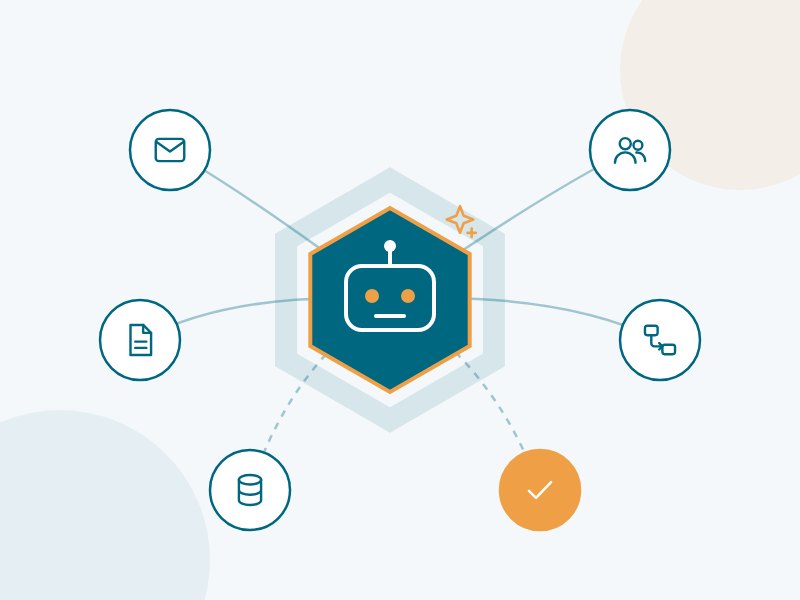
How an AI agent runs a process
Built on Microsoft Copilot Studio and Power Automate, inside your Microsoft 365 tenant.
1. Trigger
An email, form, file or record arrives — or a user asks in Teams.
2. Understand
The agent reads the request or document and works out what is needed.
3. Act
It runs Power Automate flows and updates Dynamics 365, ERP or SharePoint.
4. Check
Sensitive or unclear cases go to a person for approval.
5. Learn & report
Every action is logged; analytics show time saved and quality.
Better together
We combine both: flows for the reliable, repeatable steps, agents for the steps that need understanding and judgement.
| Classic process automation | AI agent (Copilot Studio) | |
|---|---|---|
| Input | Structured data and fixed formats | Emails, chats, documents, images — in any wording |
| Decisions | Fixed if/then rules | Reasons over the request, applies your policies and knowledge |
| When things change | Breaks, needs re-development | Adapts; escalates to a person when unsure |
| Best for | High-volume, predictable steps | Variable, judgement-heavy work — combined with flows for the reliable steps |
Where our clients start
Inbox-to-action agent
Reads incoming orders, requests and complaints from a shared mailbox, creates the record in CRM or ERP, replies to the customer and escalates exceptions.
Customer-service agent
Answers customers on your website and Teams from your knowledge base, checks order or case status, and opens a Dynamics 365 case when a person is needed.
Document-processing agent
Extracts data from invoices, contracts and forms, validates it against your rules and starts the approval flow automatically.
Start small, grow with confidence
AI Agent Discovery Workshop
We map your processes, select the 3–5 agent use cases with the best return, check data and licensing, and give you a costed roadmap.
Ask about AI Agent Discovery Workshop →Agent Pilot
A working Copilot Studio agent on your own data and systems, connected to Power Automate, with results measured from day one.
Ask about Agent Pilot →Agent Operations
Monitoring, tuning, new skills and new agents, plus governance and licence/consumption reporting.
Ask about Agent Operations →Frequently asked questions
What is an AI agent, and how is it different from a chatbot or a normal flow?
A chatbot answers questions. A Power Automate flow follows fixed rules. An AI agent does both and more: it understands free text and documents, decides which steps to take, uses your systems through flows and connectors, and asks a person when it is unsure.
Why Microsoft Copilot Studio?
It runs inside your Microsoft 365 tenant, uses your existing permissions and security, connects natively to Power Automate, Dataverse, Dynamics 365, SharePoint and Teams, and offers more than a thousand connectors. That makes it the fastest, safest way for most Microsoft-based companies to put agents into production.
What does Copilot Studio cost?
Copilot Studio is licensed by consumption (pay-as-you-go or prepaid capacity), and some scenarios are included with Microsoft 365 Copilot licences. We estimate the monthly cost for your expected volume during the discovery workshop.
Is our data used to train the AI models?
No. With Microsoft's enterprise services, your prompts and data are not used to train the foundation models, and agents only see what their connections and users are permitted to see.
How do we keep control of what an agent does?
Each agent has defined tools and permissions, approval steps for sensitive actions, full activity logs and analytics. We start with a person reviewing the agent's work and increase autonomy as results prove reliable.
What is agentic AI?
Agentic AI describes AI systems that do not just answer questions but plan and carry out tasks: they break a goal into steps, use tools such as Power Automate flows, connectors and APIs, check the result and ask a person when needed. In the Microsoft ecosystem, agentic AI is built mainly with Copilot Studio and Microsoft Foundry.
Which systems can an AI agent connect to?
Through Copilot Studio and Power Automate connectors, an agent can work with Dynamics 365, Dataverse, SharePoint, Outlook, Teams and Excel, and with ERPs, e-shops and other systems through REST APIs or MCP servers. When a system has no API, a computer-using agent can operate its user interface.
Do our employees need Microsoft 365 Copilot licences to use a custom agent?
Not necessarily. Agents built in Copilot Studio can be published to Teams, your website and other channels and are paid for by usage through Copilot Studio capacity. Users who already have Microsoft 365 Copilot can use many agent scenarios within their licence. We recommend the most economical combination for your case.
Can an AI agent work in several languages?
Yes. Copilot Studio agents can understand and answer in many languages, including English, Greek, German, French, Spanish and Italian. During the pilot we check language support for the features you need and test the quality of the answers in each language.
What is the difference between Microsoft 365 Copilot and Copilot Studio?
Microsoft 365 Copilot is the AI assistant inside Outlook, Teams, Word and Excel that helps each person with their own work. Copilot Studio is the tool for building your own agents – agents that follow your processes, use your data and act in your systems. Agents built in Copilot Studio can also be made available inside Microsoft 365 Copilot and Teams.
Can an AI agent answer questions from our own documents?
Yes. Copilot Studio agents can use SharePoint sites, uploaded files, public websites and Dataverse tables as knowledge sources, and show where each answer comes from. With SharePoint sources and signed-in users, answers respect each user’s existing permissions.
What happens after the agent goes live?
We monitor conversations, resolution rates and hand-overs to people with Copilot Studio analytics, update knowledge and topics as your business changes, and review the results with you every month. A support agreement covers fixes, new Microsoft features and small improvements.
Which process is best for a first AI agent?
A good first agent handles a frequent, well-understood request with a clear owner – for example order-status questions, HR or IT requests, quote preparation or sorting incoming emails and documents. We score your candidates on volume, effort saved and risk in the discovery workshop and start with the one that pays back fastest.
Can an AI agent work on our website, Teams or WhatsApp?
Yes. Copilot Studio agents can be published on your website, in Microsoft Teams and Microsoft 365 Copilot, in mobile apps and other channels. Customer channels such as WhatsApp, SMS and voice are available through Dynamics 365 Contact Center, where the agent can also hand the conversation to a person.
Can an AI agent work on its own, without someone chatting to it?
Yes. Autonomous agents start from triggers – a new email, a new record in Dynamics 365, a file in SharePoint or a schedule – and carry out the task in the background. Each agent works within the permissions and tools we give it, and sensitive steps can still require human approval.
Are AI agents compliant with the GDPR and the EU AI Act?
Copilot Studio runs within Microsoft’s enterprise data protection commitments, and we design each agent with data minimisation, clear information that users are talking to an AI, logging and human oversight. We help you document the agent for your GDPR and AI Act obligations; for a final legal opinion, your legal adviser or DPO should review it.
Are you a Copilot Studio partner in Greece, and do you work internationally?
Yes. Winsolv is a Microsoft partner in Athens that builds AI agents for business with Copilot Studio — from an AI chatbot for business websites to AI process automation in the back office. We work with companies in Greece and worldwide, remotely or on-site, in English and Greek.
Other services:
Let's talk about AI agents
Book a free 30-minute call. We'll discuss your situation and suggest a practical first step.
Book a free 30-minute consultation